Product Guide
Export Journal Listing
You can export a journal in several different document formats, for printing and use in other ways
Flojourn lets you collect and organise information. But sometimes you will want to take information from Flojourn and use it elsewhere.
The Export facility is a Club Tier feature that allows you to export your data in several formats.
Export Formats
You can export your journal in several different formats depending on what you want to do with it.
DOCX
This is the MS Word document format which can be opened by most word processors. This is a good option where you may want to hand edit the output after it has been exported. You may also simply want to apply addtional formatting.
PDF is a universal format that can be ready by numerous applications on virtually all platforms. PDF files cannot be edited so this is a good format for sending data to people and ensuring the content does not get changed.
HTML
This is for people who already know how to edit web pages. HTML files can be viewed locally in a web browser and would make copy and pasting parts into other web pages easier.
JSON
This is a data format which is used for data interchange and is understood by AI. Again this format is for experts but it exists so you can export data and potentially import it into other applications.
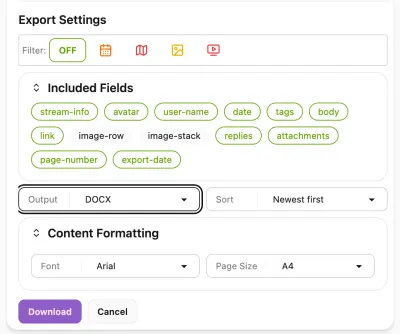
Export Settings Dialog
To download an export you start in the journal you want to show. Then click on the Export button in the Journal Info panel. This opens the export dialog.
Filter
You can filter the entries to only include events, or entries with maps or videos etc.
Included Fields
You can also choose which bits of information will be shown in the list. For instance you may not want to show the avatar of the entry creator on your website.
Sort
You can specify the sort order of the entries: oldest first, newest first or in event date order.