
Product Guide
Managing Polls
You can ask people a question with a poll to get feedback and to have fun.
You can create and entry in a journal and set it to be a poll. The entry can have any of the usual information on a journal entry (eg text styling, images, etc) but it will include a set of up to seven options to vote for.
The visitor clicks on one option to highlight it and is then shown a Vote button to confirm their choice. They are then shown the current tally of votes in both percentages and counts with a bar graph to illustrate the result. After voting a visitor will only be shown the results, and cannot vote again.
Creating a Poll
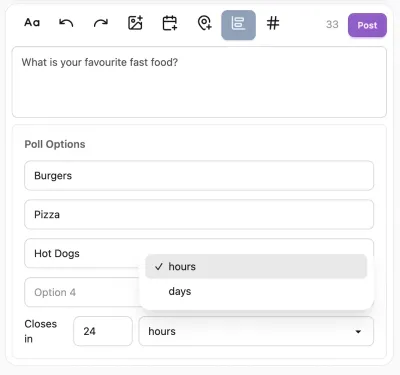
Create en entry in a journal in the normal way and choose the "poll" option from the top edge of the editor. The normal text entry becomes the question and entry blanks are provided for three options.
As the blanks are filled with the options new blanks are automatically added until the limit of seven options is reached.
Polls are intended to close after a certain length of time and you can specify a number of hours or days for the poll to run.
Visitor Experience
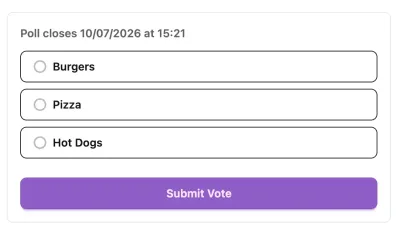
Until the poll closes, people will see the question and buttons for each answer. People will need to log in to actually vote.
Once a visitor votes, they see the results as a bar chart with counts and percentages, even if they leave and return to the poll.
Once the poll has ended, everyone sees the poll results.
Uses for a Poll
There are plenty of feedback and discussion tools in flojourn but polls are a really good way to ensure that people focus on a small set of alternatives and you and everyone in your group can easily interpret the results.
Polls help create engagement and can be used both for serious discussions about policy or as daily fun questions.